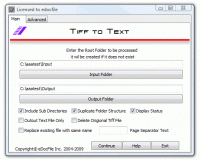
Tiff to Text is designed to perform Optical Character Recognition (OCR) in a batch process. The program utilizes the OCR engine from Nuance (Owners of OMNI Page - formally ScanSoft) that is included with Microsoft Office Document Imaging (MODI).
Tiff to Text is designed to perform Optical Character Recognition (OCR) in a batch process. The program utilizes the OCR engine from Nuance (Owners of OMNI Page - formally ScanSoft) that is included with Microsoft Office Document Imaging (MODI). Without question this OCR engine is one of the five best in the World, and is available in different languages. If English is not the language to be used the setup will prompt the user for the location of MODI.
With Tiff to Text the user has the option of processing all of the tiff images in a file folder as well as all sub folders that contain tiff images. The output will be a matching file folder structure with either the tiff image along with a matching text file created from the OCR or just the text file.
Tiff to Text is easy to setup as the user only has to enter the input folder and output folder along with some simple choices. Required Setup information: ~ Include Sub Directories - this will OCR all the tiff images in the Sub Directories of the root ~Duplicate Folder Structure - this makes a matching output file folder hierarchy of the OCR'd images, if not selected all output files will be placed in the output root. Display Status - allows the user to see what file is being OCR'd. Output Text File Only - just creates a matching text file from the OCR contents. Delete Original Tiff image - Deletes the file that was processed. Advanced Options: Standard Output - Normal OCR text file
Upper Case - All of the OCR text is converted to Upper Case. Lower Case - All of the OCR text is converted to Lower Case. Strict ASCII - Only outputs the OCR text that contains character codes between 0 - 127. Printable ASCII - Only outputs the OCR text that contains character codes 10, (line feed), 13 (Carriage Return) and codes 32 to 126. Custom - the user can input a string of character codes to be returned from the OCR such as 10, 13, 48-57 which would just output the numbers contained within the tiff image. Command line option. Whats new in version 3.0: Added Command line function Requirements: Microsoft Office Document Imaging Operating system: WinXP,Windows2000,Windows2003,Windows Vista Starter,Windows Vista Home Basic,Windows Vista Home Premium,Windows Vista Business Limitations: Prompts after each 5 files Release notes: Major Update
Integrated with Microsoft Outlook. Set up phone, Email, text message, instant message, and Fax reminders directly from Outlook calendar.
Price: $0, Rating: 9, Downloads: 366 Download
AnyBizSoft PDF to PowerPoint Converter is a powerful PDF converter software which helps you easy to convert multiple PDF files at the same time to editable and dynamic PPT presentations with perfect effects.
Price: $29.95, Rating: 0, Downloads: 165 Download
PDF restrictions remover software unlock PDF security owner password and enables PDF content copying, document printing, form filling and modifying. Decryption tool supports 40-bits/128-bits RC4 and 128-bits AES encrypted PDF files to unrestrict.
Price: $24.95, Rating: 4, Downloads: 147 Download
PDF password security guard, protect your digital property from unauthorized person by securing them with pdf open password, preventing them from printing, text copying, filling, commenting with owner password restrictions and by encrypting.
Price: $19.95, Rating: 5, Downloads: 145 Download
User Rating
Rating:2.2 out of
5 Based on13 ratings.
13 user reviews.

 Tiff to Text 3.0 details